Use case

A restricted zone, after hours: an alert the moment it happens

We can mark restricted areas on a camera snapshot or set the hours when your site should be empty. The system alerts your team if it detects someone in a restricted area or on site outside business hours.
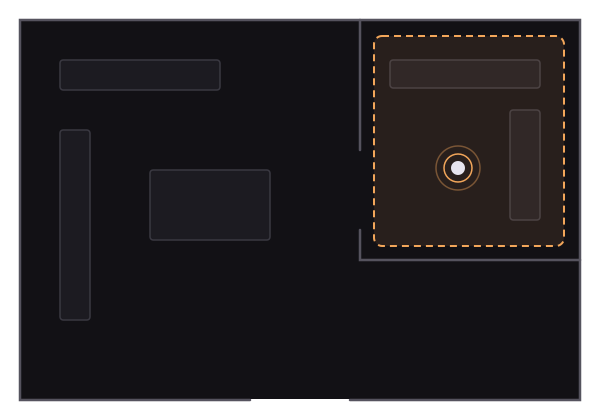
A room seen from above: an orange dashed zone marks a restricted zone, and the dot inside it is a person the system has detected.
  • Back Room · Restricted Zone22:14

    Presence outside business hours.

Example with illustrative data

Challenge

Nobody watches every screen all night

  • Incidents are found afterwards

    The recording shows what happened, but only once it is too late.

  • Nights and weekends

    A site after hours is hard to watch without a break.

  • Staff-only areas

    Back rooms and plant rooms are seldom in anyone's view.

What the system detects

  • Someone in a restricted zone

    Presence in the marked area, the moment it happens.

  • Presence after hours

    Anyone on site in the hours when it should be empty.

  • No identity

    The system detects that someone is there, not who.

Demonstration

What it looks like in practice

AI-generated scene, processed by Analitix.AI models. Once installed, you see real detections on your own cameras.

Example with illustrative data

Transcript

No one can watch every screen. Analitix.AI flags only what matters.

What your team sees

  • 3

    Presence events today

  • 22:14

    Last presence

Back Room · Restricted Zone22:14

Presence outside business hours.

Example with illustrative data

From detection to action

  1. The system detects a presence in a restricted zone or outside business hours
  2. When an event happens or a set threshold is passed, an alert arrives by Slack, email, WhatsApp, or a webhook
  3. The right person is notified immediately, on their phone, computer, or smartwatch
  4. The team acts, and the dashboard's numbers show whether it helped

Our team sets up the zones, thresholds, and alert recipients, with no new development.

Business outcome

A response before an incident escalates

  • A response while it happens

    The right person is notified at once, not the next day.

  • Quieter nights

    The site is watched after hours without anyone having to stare at a screen.

What to know before a quote

Cameras
Your existing cameras with a view of the restricted zone or of the site's entrances; we check suitability on sample clips you send us, with your consent, before setup, and delete them as soon as the models are prepared.
Availability
Ready – introduced on your existing cameras
Integrations
A dashboard on a computer or phone; alerts by Slack, email, WhatsApp, or a webhook; your own zone names, such as “Back room”.
Validation
Accuracy is measured on your own cameras rather than promised.
Underlying measurement
Presence detection

We detect situations, not who anyone is

Video is never stored, and faces are never recognised. The results are numbers and events with a place and time, with nothing about who anyone is.

Tell us which zones you want to protect

We'll check whether your cameras are suitable and send a quote for your sites.

Pricing model
Pricing depends on the number of cameras and the selected AI models. The Analitix Edge Box is a one-time purchase.
Technical requirements
A compatible video surveillance system and an on-site technical contact to connect the device to your existing infrastructure.
Response time
We respond to quotation requests within one working day.