From a camera image to a number for a decision.
Analitix.AI uses the cameras you already have. The Analitix Edge Box on site counts people and measures how long they stay, and you see the results on a dashboard, in real time.
Analitix.AI uses the cameras you already have. The Analitix Edge Box on site counts people and measures how long they stay, and you see the results on a dashboard, in real time.
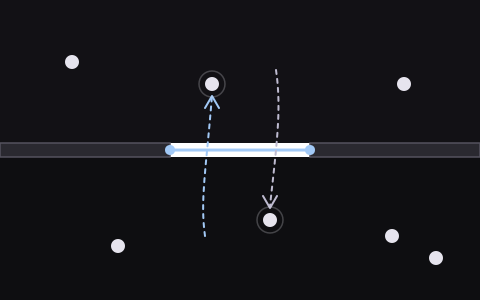
Step 1
We first check each camera on a sample clip you send us, with your consent; we use the clips only to prepare and train the AI models for your cameras, then delete them straight away. Then an on-site staff member plugs the Analitix Edge Box into the recorder and the network, and we connect it to your cameras remotely over the standard RTSP protocol, inside your local network.
Step 2
On a snapshot from each camera, we draw lines with you, at an entrance for example, and zones, such as in front of the checkouts. You choose the names, such as “Checkout 1”.
Step 3
The Analitix Edge Box (NVIDIA Jetson) detects people in the image in real time, counts line crossings, and measures time in zones. Video is never stored. Only metrics and event records leave the site.
Step 4
A clear dashboard on your computer or phone, alerts that reach the right person, and a forecast, such as today's traffic to the end of the day.
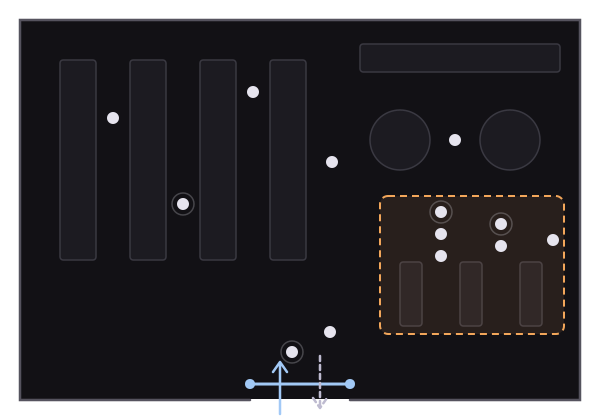
Example with illustrative data
IP/RTSP
cameras and recorders (NVR/DVR) from any common manufacturer: no new cameras needed, and yours keep running
About 4 hours
to connect and set up, with our team at every step
Remotely
our team handles monitoring and updates
Together, we will define your business priorities, assess the compatibility of your existing video surveillance system and recommend a solution tailored to the needs of your locations.